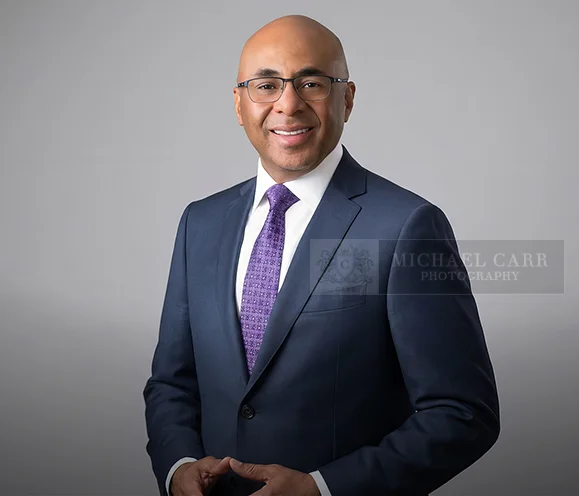
A professional headshot is often one of the first images clients, colleagues, recruiters or business contacts see.
It may appear on LinkedIn, a company website, executive biography, professional directory, speaking profile or marketing material.
Good preparation helps ensure the portrait supports the professional image you want to present.
LinkedIn recommends using a professional profile photograph that clearly represents you and supports your professional presence.
These Professional Business Headshot Tips can help you prepare for your session and understand the decisions that influence the finished portrait.
1. Decide How You Will Use the Headshot
Before choosing clothing or backgrounds, think about where the final image will appear.
Your headshot may be used for:
Company websites
Executive biographies
Professional directories
Speaking engagements
Press releases
Social media
Marketing materials
Knowing the intended use helps determine the appropriate wardrobe, background, expression and image composition.
A traditional executive portrait may work well for a leadership page, while a slightly more relaxed image may be appropriate for LinkedIn or client facing marketing.

2. Choose Wardrobe That Fits Your Professional Role
Your clothing should reflect your industry, position and personal brand.
A tailored jacket may be appropriate for an attorney, executive or financial professional.
An entrepreneur or creative professional may prefer a more contemporary business casual approach.
Solid colors and subtle textures generally photograph well because they keep attention on your face.
Avoid clothing that feels uncomfortable or noticeably different from what you normally wear professionally.
The goal is to look polished without appearing unlike yourself.
For additional wardrobe guidance, see our article about the best color to wear for professional headshots.
3. Bring More Than One Wardrobe Option
If your session allows wardrobe changes, bringing more than one option can create useful variety.
You might consider:
A jacket
A professional blouse or shirt
A more formal outfit
A business casual option
A second color choice
Different clothing can change the overall feeling of the portrait without requiring a completely different photography style.
If you are unsure what photographs best, bring options and discuss them with your photographer before the session begins.
4. Pay Attention to Grooming
Small grooming details are more noticeable in a close professional portrait.
Hair should be styled in a way that feels familiar and professional.
Facial hair should be groomed intentionally.
Glasses should be clean.
If you wear makeup, it should support your usual appearance rather than make you look dramatically different.
Professional hair and makeup can also be helpful when appropriate for the session.
The goal is refinement, not transformation.

5. Let the Photographer Guide Your Posing
Most professionals do not know instinctively how to pose for a headshot.
You should not need to.
Professional posing direction helps with:
Posture
Shoulder position
Chin position
Hands
Body angle
Expression
Very small adjustments can improve a portrait significantly.
The photographer should guide you rather than expecting you to arrive knowing what to do.

6. Think About the Expression You Need
A professional headshot does not always require the same expression.
Depending on your role, you may want the portrait to feel:
Approachable
Confident
Professional
Warm
Authoritative
Relaxed
Contemporary
Creating several expressions during the session can provide useful options.
An executive biography may call for a different expression than a client facing LinkedIn profile.
7. Choose the Background Intentionally
The background should support the portrait without distracting from you.
Possible options may include:
Simple studio backgrounds
Contemporary backgrounds
Office inspired settings
Environmental portraits
Neutral backgrounds
Background choice should also consider how the image will be used.
For example, a company website may need consistency across several executives, while an individual professional may have more flexibility.
Our article about office backgrounds for professional portraits provides additional ideas for creating a professional environment without allowing the background to overpower the person.

8. Professional Lighting Matters
Lighting affects facial shape, skin tone, clothing and the overall mood of the portrait.
Professional studio lighting provides consistency and allows the photographer to adjust the light based on the person being photographed.
The goal is not simply to make an image bright.
Good portrait lighting should create dimension, maintain natural skin tones and keep attention on the subject.
This is one area where professional photography differs significantly from an ordinary snapshot.

9. Create More Than One Useful Image
If your professional needs extend beyond a single headshot, consider creating several images during the session.
You may benefit from:
A traditional head and shoulders portrait
A three quarter portrait
A standing image
A more relaxed professional portrait
A horizontal image for website use
A personal branding photograph
A contemporary business portrait
This gives you more flexibility across different platforms.
Professionals who need a broader collection of images may also want to explore personal branding photography.
10. Choose Images Based on Professional Use
After the session, evaluate your images based on how well they support your professional goals.
Do not select an image only because it is technically flattering.
Also consider:
Does the expression feel appropriate for my role?
Does the portrait look current?
Will it work well on my company website?
Does it represent how I want clients or colleagues to see me?
Can it be used across more than one platform?
The strongest image is usually the one that balances professionalism, personality and intended use.
How Often Should You Update a Business Headshot?
There is no universal rule for how often a professional headshot should be replaced.
Consider updating your portrait when:
Your appearance has changed noticeably
You change companies
You receive a major promotion
Your professional role changes
Your existing photograph looks dated
Your company updates its visual branding
You begin speaking publicly or appearing in the media more often
The photograph should represent how you currently look and how you currently present yourself professionally.
Preparation Helps Create a Better Portrait Experience
The strongest Professional Business Headshot Tips are really about preparation.
Knowing how the photograph will be used, planning wardrobe, considering expression and communicating with your photographer before the session can make the process easier and the final images more useful.
To learn more, visit our Houston business portrait experience and see how Michael Carr Photography creates professional portraits for executives, business owners and professionals.
Michael Carr Photography has photographed Houston professionals and families for more than 30 years.
Our studio is located at 5701 Woodway Drive, Suite 108, Houston, Texas 77057.
To schedule a consultation, contact Michael Carr Photography at 713 461 2862.

